> For the complete documentation index, see [llms.txt](https://docs.wizz.cash/wizz-wallet/llms.txt). Markdown versions of documentation pages are available by appending `.md` to page URLs; this page is available as [Markdown](https://docs.wizz.cash/wizz-wallet/dev/electrumx-guides/partial-coloring-custom-coloring.md).
# Partial Coloring / Custom Coloring
Describe the implementation detail of Particial Coloring / Custom Coloring of Atomicals and how to integrate with these features.
New coloring features are introduced with Atomicals ElectrumX v.1.5.0 and could be activated at the block height 848484 on the livenet (2584936 on the testnet).
The runnable code should be based on the v1.5.\* tags. See the [API Integration Guide](/wizz-wallet/dev/electrumx-guides/api-integration-guide.md) for the migration guide for the breaking change.
### Partial Coloring
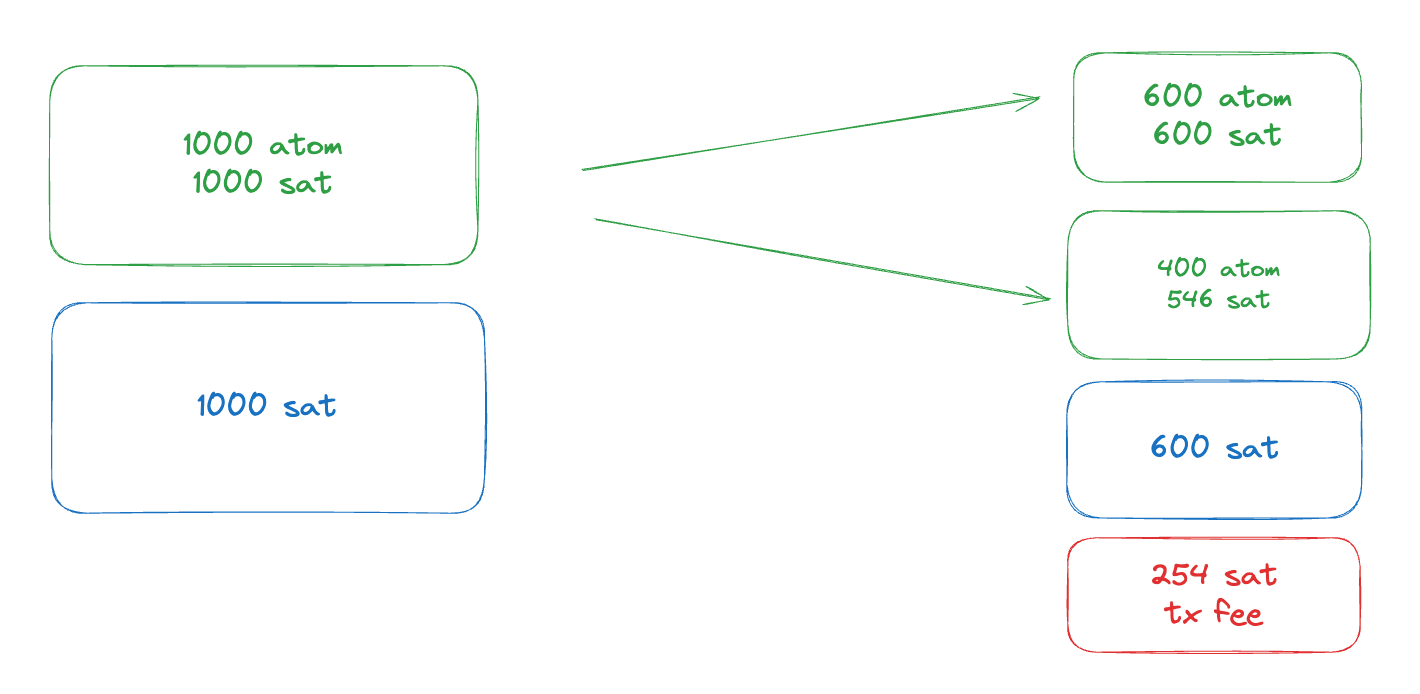
The partial coloring ability allows Atomicals value to be divided less than *546* without burning in some cases. The user has no direct interaction with the feature because it is a subset of the Atomicals Transfer Rules. Here are some transaction cases that would not burn the Atomicals:
#### Fully colored -> Partially colored
Input/Output
Satoshis
Atomicals
vin:0
1000
1000 ATOM
vin:1
9900
0 ATOM
vout:0
900
900 ATOM
vout:1
10000
100 ATOM
When the transaction is trying to assign *900 ATOM* to the `vout:0`, *100 ATOM* is left which results in burning without the feature. Now, with the partial coloring, the transaction should try to assign the *100 ATOM* to the `vout:1`, and it can since `sats_value >= atomical_value`.
| Input/Output | Satoshis | Atomicals |
| ------------ | -------- | --------- |
| vin:0 | 1000 | 1000 ATOM |
| vin:1 | 546 | 0 ATOM |
| vout:0 | 999 | 999 ATOM |
| vout:1 | 547 | 1 ATOM |
Here is another example of the coloring. If you want to split *1 ATOM* (or *999 ATOM*) from the `vin:0`, assign the *1 ATOM* to `vout:1`. The `vout:1` could be *546* sats too since its `sats_value >= atomical_value`.
#### Partially colored -> Fully colored
| Input/Output | Satoshis | Atomicals |
| ------------ | -------- | --------- |
| vin:0 | 1000 | 100 ATOM |
| vin:1 | 1000 | 900 ATOM |
| vout:0 | 1000 | 1000 ATOM |
| vout:1 | 1000 | 0 ATOM |
With 2 partially colored UTXOs, assigning them to one specific output will be done automatically.
***
### Custom Coloring
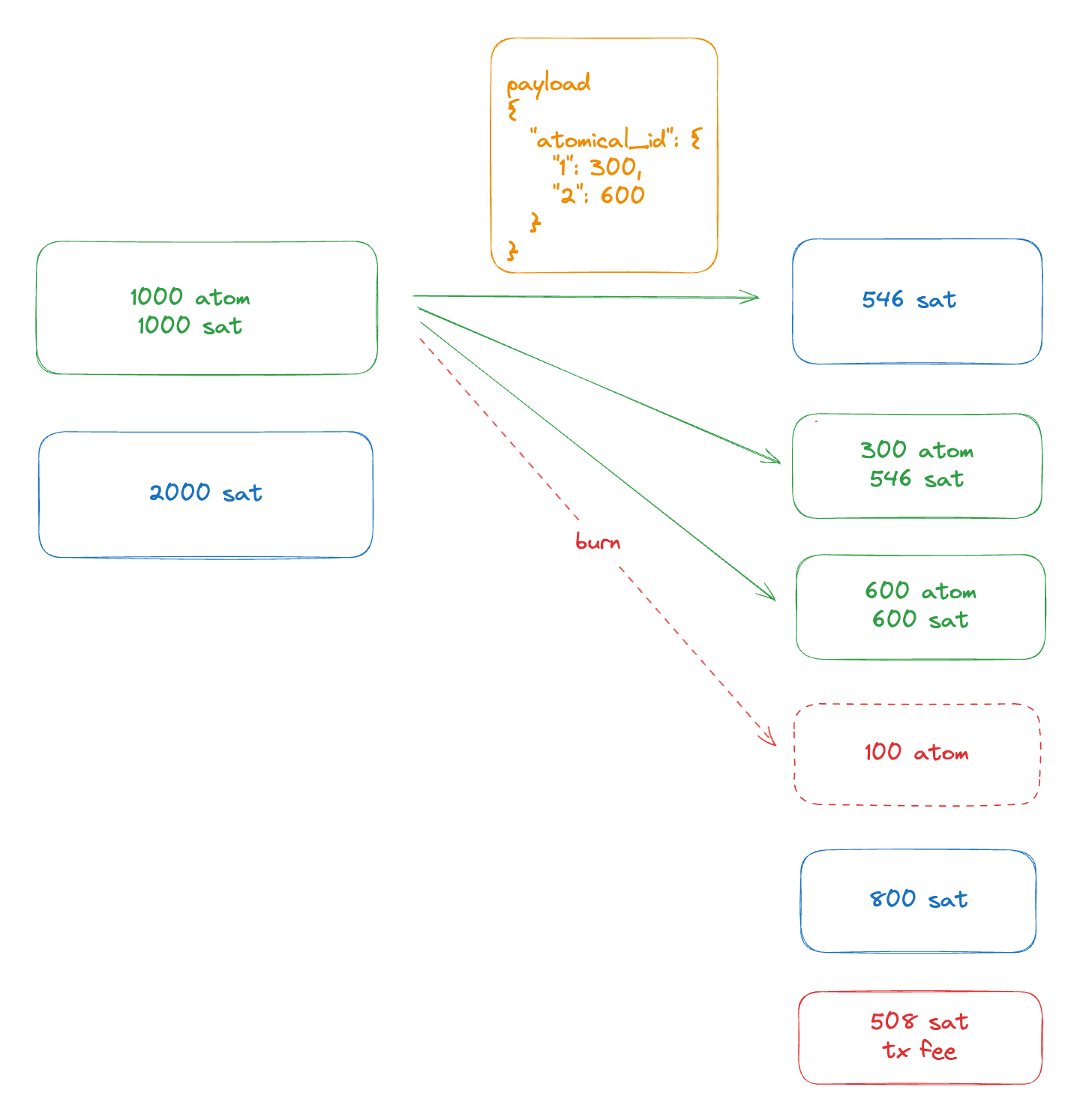
The custom coloring ability allows Atomicals value to be separated less than *546* by introducing the `z` operation. The value is without decimals and should follow the normal transfer rules.
{% hint style="warning" %}
Even if the Atomical value can be less than *546*, the UTXO value should remain not less than 546. The important rule is `sats_value >= atomical_value`. Sats value and Atomical value can combined in any case based on the rule.
{% endhint %}
#### Notice of the operation
`z` is powerful, but it should be only used in certain cases to avoid more gas during transactions. Here are some notices about the `z`.
1. Use it only when the Atomicals value in all outputs is less than *546*, or it could lead to extra size compared to a normal transfer transaction (cleanly assigned).
2. The coloring value must not be greater than the satoshis value of the UTXO, coloring values greater than the satoshis value will be reset to the satoshis value, and the **remaining values will be burned**.
#### Main Steps
To send a custom coloring transaction, you shall follow these instructions:
1. Put `z` as the OP code in HEX (`7a`).
2. Put the desired colored Atomicals value records into the `payload`. The record should follow the structure (in TypeScript): `Record>`.
3. Gather UTXOs to back coloring values, and make sure each UTXO has `sat_value >= atomical_value`.
An example payload could be:
```
{
"9527efa43262636d8f5917fc763fbdd09333e4b387afd6d4ed7a905a127b27b4i0": {
0: 1000,
1: 2000
},
"8888e25790cc118773c8590522e1cab2ccc073a9375b238aaf9aadb13a764a13i0": {
2: 3000,
3: 4000
}
}
```
The payload indicates that the ARC-20 with ID `9527...` should have *1000* in the `vout:0`, and *2000* in the `vout:1`. And the ARC-20 with ID `8888...` should have *3000* in the `vout:2`, and *4000* in the `vout:3`.
#### Split merged assets
Since the operation can define where Atomicals go, the `z` operator can be considered as the advanced version of `x` (splat) + `y` (split), their operations can be done during custom coloring in one single `z` transaction. Developers should choose between these operations according to use cases.
#### Custom coloring code example
```typescript
// current connected account address info
const addressInfo = {
output: ...,
scripthash: ...,
network: ...,
}
// query all atomicals balance
const balance = await fetch(`${electrumUrl}/blockchain.atomicals.listscripthash?params=["${addressInfo.scripthash}",true]`, { signal: controller.signal }).then((res) => {
return res.json();
});
// pure utxos without any assets
const pureUTXOs = balance.utxos.filter((utxo: any) => {
if (Array.isArray(utxo.atomicals)) {
return utxo.atomicals.length == 0;
}
if (typeof utxo.atomicals === 'object') {
return Object.keys(utxo.atomicals).length === 0;
}
// unreachable
return false;
}).sort((a: any, b: any) => b.value - a.value);
const atomicals = balance.atomicals;
const utxos = balance.utxos;
const fs: Record = {};
for (const utxo of utxos) {
// compatible with old format
if (Array.isArray(utxo.atomicals)) {
// ignore merged assets
if (utxo.atomicals.length !== 1) {
continue;
}
const atomicalId = utxo.atomicals[0];
const atomical = atomicals[atomicalId].data;
if (atomical.type !== 'FT') {
continue;
}
utxo.atomical_value = utxo.value;
if (atomical.utxos) {
atomical.utxos.push(utxo);
atomical.atomical_value += utxo.value;
} else {
atomical.utxos = [utxo];
atomical.atomical_value = utxo.value;
}
fs[atomicalId] = atomical;
}
// new format
else if (typeof utxo.atomicals === 'object') {
// ignore merged assets
if (Object.keys(utxo.atomicals).length !== 1) {
continue;
}
for (const atomicalId in utxo.atomicals) {
const atomical = atomicals[atomicalId].data;
if (atomical.type !== 'FT') {
continue;
}
utxo.atomical_value = utxo.atomicals[atomicalId];
if (atomical.utxos) {
atomical.utxos.push(utxo);
atomical.atomical_value += utxo.atomical_value;
} else {
atomical.utxos = [utxo];
atomical.atomical_value = utxo.atomical_value;
}
fs[atomicalId] = atomical;
}
}
}
const allFTs = Object.values(fs);
// pick a FT from allFTs
const ftUTXOs = selectedFT.utxos;
// send ft amount
const amount = 1;
// input ft value
let inputFTValue = 0;
// remainder ft value
let remainderFTValue = 0;
// input ft utxos
const revealInputs = [];
for (const utxo of ftUTXOs) {
inputFTValue += utxo.atomical_value;
revealInputs.push(utxo);
remainderFTValue = inputFTValue - amount;
if (remainderFTValue >= 0) {
break;
}
}
const payload: Record> = {};
const revealOutputs = [
{
// send to any address
address: toAddress,
// ft value less than the dust amount(546) will be partially colored.
value: Math.max(amount, 546),
},
];
payload[selectedFT.atomical_id] = {
0: amount,
};
if (remainderFTValue) {
revealOutputs.push({
address: address,
// ft value less than the dust amount(546) will be partially colored.
value: Math.max(remainderFTValue, 546),
});
payload[selectedFT.atomical_id][1] = remainderFTValue;
}
// prepare commit reveal config
const buffer = new AtomicalsPayload(payload).cbor();
// user's public key to xpub
const selfXOnly = toXOnly(Buffer.from(publicKey, 'hex'));
// use `z` op type
const { scriptP2TR, hashLockP2TR } = prepareCommitRevealConfig('z', selfXOnly, buffer, addressInfo.network);
const hashLockP2TROutputLen = hashLockP2TR.redeem!.output!.length;
// calculate fee
const revealFee = calculateAmountRequiredForReveal(feeRate, revealInputs.length, revealOutputs.length, hashLockP2TROutputLen);
// calculate need for reveal transaction
const revealNeed = revealFee + revealOutputs.reduce((acc, output) => acc + output.value, 0) - revealInputs.reduce((acc, input) => acc + input.value, 0);
// prepare commit transaction
// reveal transaction output
const outputs = [
{
address: scriptP2TR.address!,
value: revealNeed,
},
];
const inputs = [];
let inputSats = 0;
let ok = false;
let fee = 0;
// calculate utxo inputs and fee
for (const utxo of pureUTXOs) {
inputSats += utxo.value;
inputs.push(utxo);
fee = calculateFeesRequiredForCommit(feeRate, inputs.length, 1);
let v = inputSats - fee - revealNeed;
if (v >= 0) {
if (v >= 546) {
fee = calculateFeesRequiredForCommit(feeRate, inputs.length, 2);
v = inputSats - fee - revealNeed;
if (v >= 546) {
outputs.push({
address,
value: v,
});
}
}
ok = true;
break;
}
}
if (!ok) {
throw new Error('Insufficient funds');
}
// create commit psbt
const commitPsbt = new bitcoin.Psbt({ network: addressInfo.network });
for (const input of inputs) {
commitPsbt.addInput({
hash: input.txid,
index: input.index,
sequence: 0xfffffffd,
witnessUtxo: {
script: addressInfo.output,
value: input.value,
},
tapInternalKey: selfXOnly,
});
}
commitPsbt.addOutputs(outputs);
// get the transaction txid for reveal input utxo hash
const tx = commitPsbt.__CACHE.__TX as Transaction;
const txId = tx.getId();
// create reveal psbt
const revealPsbt = new bitcoin.Psbt({ network: addressInfo.network });
// build tap leaf script
const tapLeafScript = {
leafVersion: hashLockP2TR!.redeem!.redeemVersion,
script: hashLockP2TR!.redeem!.output,
controlBlock: hashLockP2TR.witness![hashLockP2TR.witness!.length - 1],
};
revealPsbt.addInput({
sequence: 0xfffffffd,
// commit transaction txid
hash: txId,
index: 0,
witnessUtxo: { value: revealNeed, script: hashLockP2TR.output! },
tapLeafScript: [tapLeafScript as any],
});
// add reveal inputs
for (const revealInput of revealInputs) {
revealPsbt.addInput({
sequence: 0xfffffffd,
hash: revealInput.txid,
index: revealInput.index,
witnessUtxo: { value: revealInput.value, script: addressInfo.output },
tapInternalKey: selfXOnly,
});
}
revealPsbt.addOutputs(revealOutputs);
// sign commit psbt
const signedCommitPsbt = await window.wizz.signPsbt(commitPsbt.toHex());
// sign reveal psbt with `signAtomical` option
const signedRevealPsbt = await window.wizz.signPsbt(revealPsbt.toHex(), { signAtomical: true });
// broadcast commit transaction
const commitTxId = await window.wizz.pushPsbt(signedCommitPsbt);
// broadcast reveal transaction
const revealTxId = await window.wizz.pushPsbt(signedRevealPsbt);
```
{% hint style="warning" %}
The demo code only supports P2TR addresses.
{% endhint %}
View [the full code example](https://github.com/WizzWallet/wizzwallet-provider-demo/blob/main/src/Split.tsx).
#### How to sign reveal psbt
```typescript
function signRevealPsbt(keyFor: ECPairInterface, psbtHex: string, network: Network) {
const psbt = Psbt.fromHex(psbtHex, { network });
const childNodeXOnlyPubkey = toXOnly(keyFor.publicKey);
const tapLeafScript = psbt.data.inputs[0].tapLeafScript![0] as TapLeafScript;
const customFinalizer = (_inputIndex: number, input: any) => {
const scriptSolution = [input.tapScriptSig[0].signature];
const witness = scriptSolution.concat(tapLeafScript.script).concat(tapLeafScript.controlBlock);
return {
finalScriptWitness: witnessStackToScriptWitness(witness),
};
};
psbt.signInput(0, keyFor);
psbt.finalizeInput(0, customFinalizer);
const tweakedChildNode = keyFor.tweak(bitcoin.crypto.taggedHash('TapTweak', childNodeXOnlyPubkey));
for (let i = 1; i < psbt.data.inputs.length; i++) {
psbt.signInput(i, tweakedChildNode);
psbt.finalizeInput(i);
}
return psbt.toHex();
}
```
### Decoding Transactions
To know the exact coloring result of a PSBT or a raw transaction, use `/proxy/blockchain.atomicals.decode_psbt` to decode a PSBT or `/proxy/blockchain.atomicals.decode_tx` to decode a raw transaction HEX string. These methods were added since v1.5.0 patch 2.